What to Show Instead of App Store Screenshots in Search
The short answer
App Store search result assets: three examples, before and after
Apps can now show one wide image or video in App Store search instead of their screenshots. Three rules make it work: show the app doing its job, keep to one idea that is readable at phone size, and for a game, show the gameplay. Leave out prices, discounts, claims you can't verify and Apple's badges, then test the asset with product page optimization.
Key facts
- 5 to 30 sLength of a search result video. It loops and plays muted in search.App Store Connect Help, Creative assets specifications
- State the obviousApple's advice for the search asset: make the app's purpose clear and show the interface, content or gameplay.Apple Developer, App Store asset best practices
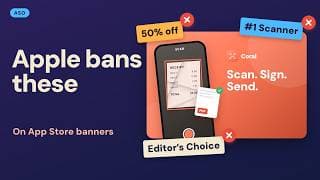
- No pricesApple doesn't allow specific pricing, discounts, website URLs or copyright symbols on these assets.Apple Developer, App Store asset best practices
- No badgesNo claims that can't be verified, and none of Apple's own recognitions such as Editor's Choice.Apple Developer, App Store asset best practices
Chapters
Transcript
Edited for readingTeal Lift, Amber Budget and Indigo Blocks are fictional apps; their screens and numbers are illustrative. Every rule comes from Apple's own pages, listed under Sources.
Which search picture would you tap?Watch from 0:00
Since 5 October, apps can swap their screenshots in App Store search for one wide picture. Here's the same fitness app, twice. Which one would you tap?
If you chose the right one, you're right. And the left one has a bigger problem than looking weak. Apple's rules don't allow it.
So here are three apps, the mistake each one makes, and the one rule that fixes it: a fitness app, a budget app, and a game. All three are made up. Every rule comes from Apple's own pages, as of 8 October.
What is the new search slot?Watch from 0:32
First, the slot itself. Apple calls it a search result asset. It's one wide image, or a video of 5 to 30 seconds.
It shows instead of your screenshots, for people on iOS 27 and later. And it's optional. Add nothing, and your screenshots stay.
Videos loop, and in search they play muted. For now, nobody can turn the sound on there.
If your app is already live, you can submit one through the Asset Library, without an app update.
Fitness app: what is wrong with this asset?Watch from 1:01
App one: Teal Lift, a workout tracker. Here's the asset a lot of fitness apps would make. A gym, a big headline, and 50% off in the corner.
Two problems. First, the discount. Apple doesn't allow prices or discounts on these assets. Second, the picture never shows the app. A searcher can't tell what Teal Lift actually does.
Here's the fix. The app's own workout screen, in the middle of a set. A rep counter, a rest timer, and three words: Log every set.
Rule one: show the app doing its job. Apple's own advice is to state the obvious, and show the interface. Someone searching for a workout tracker should see a workout being tracked, right away.
Budget app: can anyone read it?Watch from 1:43
App two: Amber Budget, a money tracker. Its mistake is the opposite. Too much app. Five screens squeezed into one picture, plus a list of eight features.
On a phone, this whole picture shrinks to the size of a single search result. Eight features in that space become noise.
Here's the fix. One screen, shown big. The budget ring, with what's left this month. And one short line: See where it goes.
Rule two: one idea, readable at phone size. Apple says focus on a single, clear idea, and keep any words short.
Your checkpoint: shrink your asset to the size of a search result. If you can't read it, a stranger can't either.
Game: what should a game show?Watch from 2:23
App three: Indigo Blocks, a puzzle game. Games love key art. A logo, a dramatic background, a big "number one puzzle game" line, and an Editor's Choice badge.
Which of those would Apple let through? Only the logo and the background. Apple says to avoid claims you can't verify, like number one. And it asks you to leave out its own badges, like Editor's Choice.
Even with those gone, a searcher still can't tell how the game plays. Here's the fix. A short video of the game itself. One satisfying move, a row clears, and it loops.
Rule three: for a game, show the gameplay. Apple names it directly: the interface, the content, or the gameplay.
If you use a video, plan for silence, because it plays muted. And make the loop clean, with no visible jump.
What does Apple not allow?Watch from 3:13
Before you submit anything, check the ban list. No prices, discounts, website links or copyright symbols. No claims you can't verify, and no awards you haven't won.
None of Apple's badges. No other stores or platforms. And every asset must suit a 4+ age rating, even if your app is rated higher.
And keep the important part in the centre. Apple warns the edges can get clipped on different devices.
Our take: if a line would need a footnote, cut it.
What should you make this week?Watch from 3:40
So, three rules. Show the app doing its job. One idea, readable at phone size. And for a game, show the gameplay.
Then use the new preview in App Store Connect. Check your asset in light and dark mode before you submit.
Will it lift your downloads? As of 8 October, we found no published results from a real test. So test your asset with product page optimization, give it time, and keep what wins.
For every spec and rule behind the slot, watch The App Store Just Changed How Apps Look in Search.
Sources
- Apple Developer, App Store asset best practices
- App Store Connect Help, Creative assets specifications
- App Store Connect Help, Manage your App Store assets
- Apple Developer News, Showcase your apps with new assets on the App Store (5 October 2026)
- Apple WWDC26, Enhance your presence on the App Store (session 205) (June 2026)
Caveat: No published performance results on the new search assets as of 8 October 2026. Search assets show for people on iOS 27 and iPadOS 27 and later, per Apple. Submitting without an app update needs an app that already has an approved version.